


Caring for an aging parent with your family
When brothers and sisters share a parent’s care, the hard part is rarely the caring. It is that each of you holds a different piece: one has the medication list, one went to the appointment, one has the discharge letter in a photo on their phone. This guide covers how families keep those pieces in one place, and how Lifelong, a family health app for iPhone, does it.
By Razi Syed, Co-founder & CEO of Lifelong Updated
How do siblings keep a parent's medication list up to date?
Keep one list that everyone reads from, and change it on the day something changes. Two lists are how a dose that was halved in March is still being given in full in June.
The National Institute on Aging suggests writing down, for each medicine, its name, the dose, and why it was prescribed, and telling every doctor about everything your parent takes, including over-the-counter medicines, vitamins and supplements. For a family, three more details earn their place:
- who prescribed it, and when it started
- when it is taken, and who is there at that time of day
- the date of the last change, and who made it
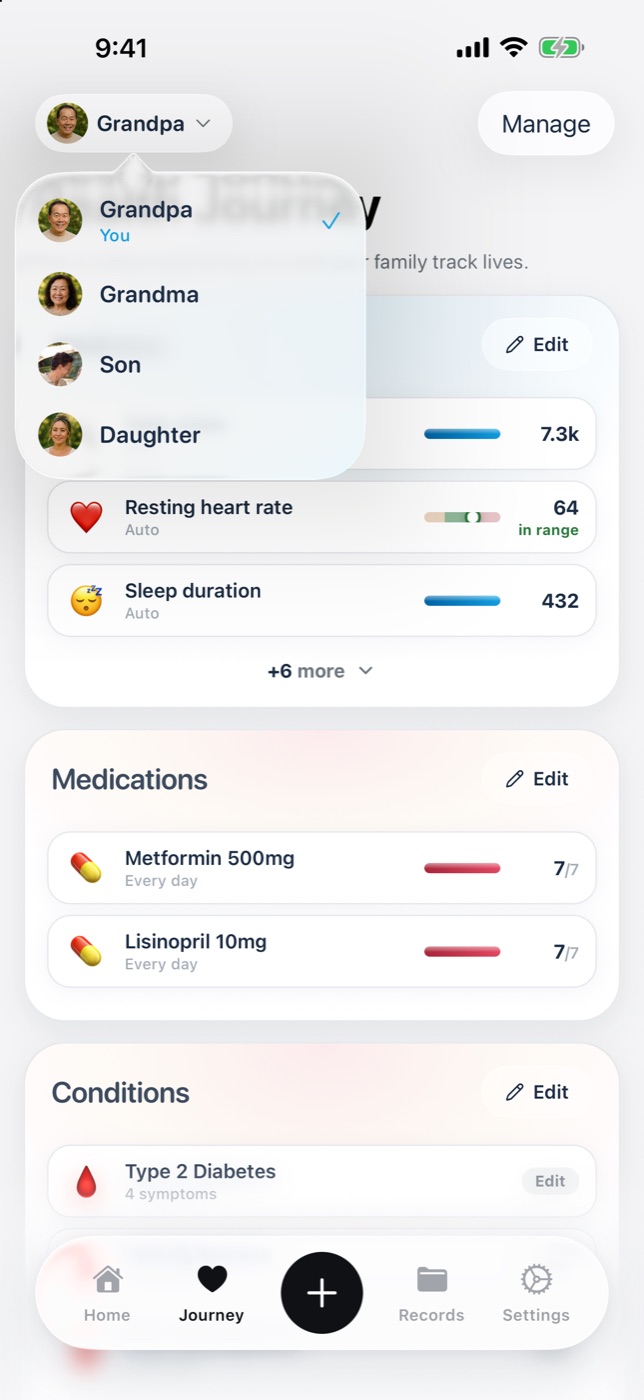
In Lifelong, a parent’s medications live on their own profile, next to their conditions and appointments. The family members that parent has shared medications with all see the same list, so there is no copy to fall out of date.
Lifelong is not a pharmacist. It does not advise on doses or on what can be taken together. For what a medicine does and what it shouldn’t be taken with, use MedlinePlus and ask the pharmacist.
What should we bring to a parent's specialist appointment?
Bring the current medication list, the results and letters the specialist hasn’t seen, a short list of questions in order of importance, and what has changed since the last visit.
That is close to the National Institute on Aging’s advice: list what you want to discuss and ask about the most important things first, bring everything your parent takes or a list of it with doses, and bring the names of their other doctors. It also suggests bringing a family member, who can take notes and help remember what was said.
When several of you share the care, decide beforehand who goes, and collect everyone’s questions in one place so the sibling in the room is asking for all of you. Afterwards, write down what was decided the same day, while it is still fresh.
Lifelong keeps a parent’s documents, such as discharge summaries, lab reports, prescriptions and letters, on a timeline you can open in the waiting room. You upload a file, a photograph or a scan, and Lifelong reads it and files it by date.
Can we record a parent's medical appointment?
Usually yes, if everyone in the room agrees. In many places the law requires the permission of every person being recorded, and getting it is your responsibility. So ask first: “Do you mind if I record this so I can remember it properly?” Most clinicians say yes. If anyone says no, don’t record.
Lifelong can record an appointment of up to 60 minutes on your iPhone. The recording is transcribed, and the transcript, a summary and suggested follow-ups are saved to the record of the person the appointment is about, where the family members they share with can read them. The audio is deleted once the transcript is confirmed. The full rules are in the Recording Consent Notice.
The summary is written by AI and can be wrong. Check anything that matters, such as a dose or a date, against the transcript or with the clinic.
Who can see a parent's health information in a family app?
In Lifelong, only the people your parent has chosen, and only the categories your parent has chosen. Nothing is visible to anyone until the person it belongs to has made that choice.
Each person in a Lifelong family has their own account and decides what the family can see, category by category: daily signals such as sleep and activity, health records and documents, medications, conditions, symptoms and appointments, and journal entries. They can narrow, widen or withdraw that at any time.
Nobody sees more because of their role. The person who created the family, the person who pays, and the person who uploaded a document get no extra view. If someone leaves the family, access ends in both directions straight away.
That design is deliberate. A parent who needs help is still an adult with a say over their own records, and families work better when everyone knows what they can and can’t see. The details are in the Family Sharing Terms and the FAQ.
How do we divide a parent's care between siblings?
Name one person as the main point of contact, give each of the others a job that suits them, and write the split down.
The National Institute on Aging recommends starting with a family conversation that includes your parent, ideally when there isn’t an emergency, then choosing a primary caregiver and deciding who is responsible for which tasks. Its questions are a good starting list: who is most confident talking to medical staff, who is good with numbers and can handle bills and insurance, who lives close enough for day-to-day help, and who can step in when the main carer needs a break.
One way to split it:
- one person goes to appointments and writes up what was said
- one person handles the pharmacy, repeats and the medication list
- one person keeps the paperwork: results, letters, insurance
- everyone can see all three
The last line is the one that usually goes missing. A shared record is what lets the sibling who didn’t go to the appointment act on what happened there.
What if we live in different cities or countries?
Distance changes which jobs you take, not whether you can help. The National Institute on Aging counts anyone who lives an hour or more away as a long-distance caregiver, and lists the work that travels well: managing money, arranging in-home care, giving the primary carer a break, and planning for emergencies.
Paperwork travels well too. The sibling overseas can keep the record in order, read the appointment summary the same evening, and collect the questions for the next visit. Lifelong is available on iPhone in the United States and several more countries.
What Lifelong doesn't do
Lifelong is a health information tool, not medical care. It does not diagnose, treat or prescribe, and it is not a monitoring service: nobody at Lifelong is watching your family’s data, and the app will not call for help. In an emergency, call emergency services.
Lifelong is on iPhone today, with an Android version coming soon, so for now each person who wants their own account needs an iPhone. The medical disclaimer sets out the rest.
Sources
Related reading
More from Lifelong
Lifelong is on the App Store for iPhone.